Your tennis match,
analysed automatically.
Raqet AI captures every rally precisely from start to finish, measures every shot in km/h and shows you where every ball lands on the court.
Features
Everything that turns a video into a better game
Raqet AI does the searching for you, shows your game in real numbers and turns your best points into finished clips.
How fast is your serve, really?
Raqet AI measures the speed of your shots in km/h, straight from the video. Serve, forehand, backhand: you see what every shot really had, instead of guessing.
After the match your game is there in numbers
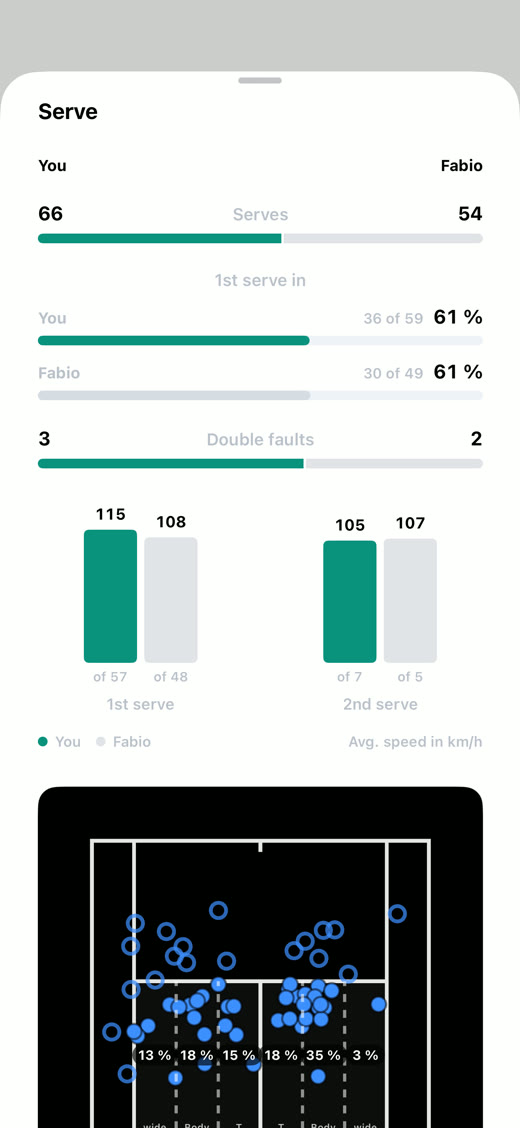
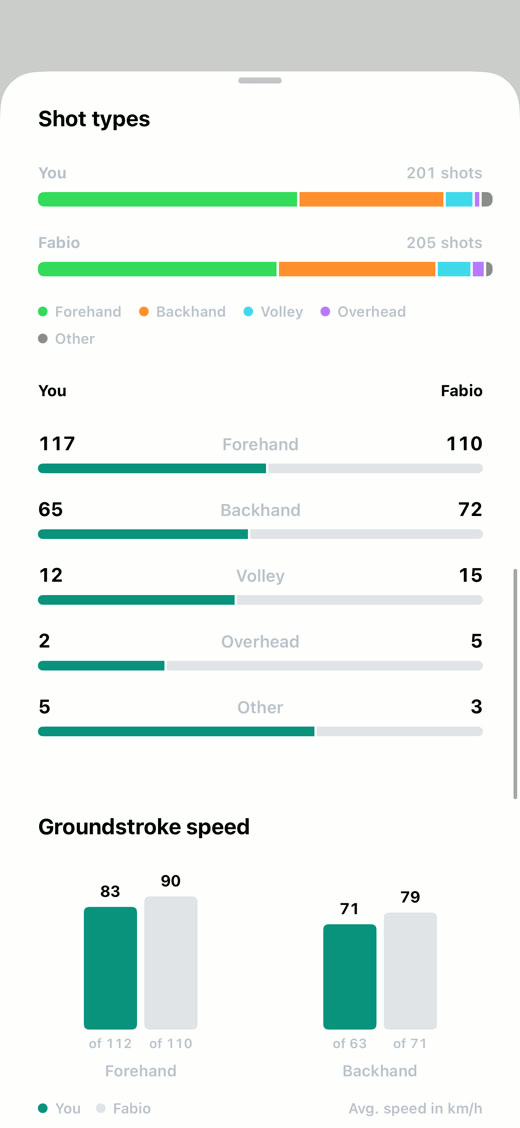
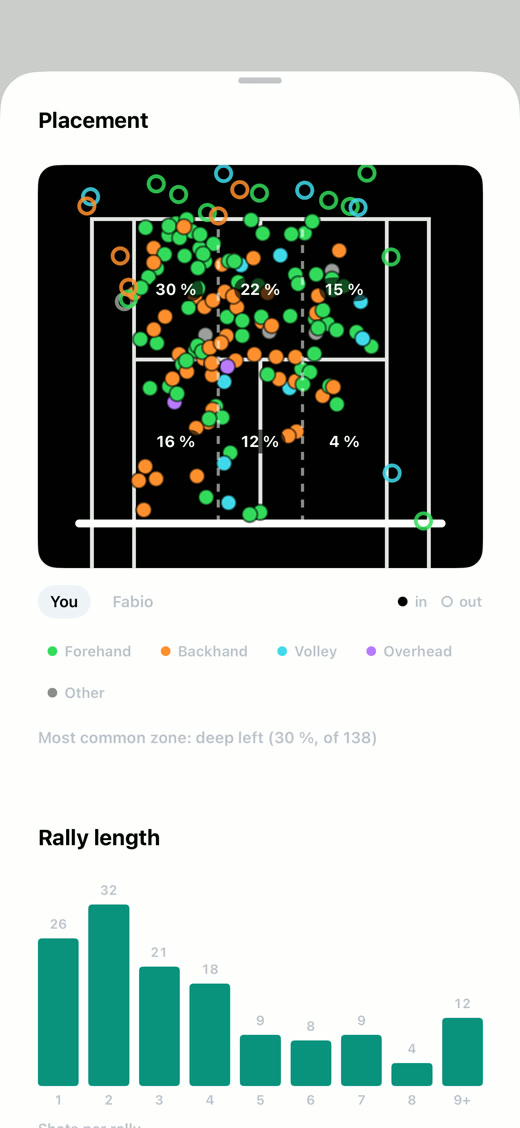
Serves, first serve percentage, double faults and average speed, your numbers right next to your opponent's. Plus the target zones of your serves and how your shot types break down. The app works it all out from the video, you never type anything in.
The AI spots every rally while you're still playing
The AI analyses the recording while you play. When you hit stop, every rally is already detected and you can watch them straight away. No waiting and no searching through the video.
54 minutes of footage hold just 17 minutes of tennis
The AI detects every rally and lays out your match point by point. You watch just the points you played, without scrubbing through the breaks.
Raw footage
With Raqet AI
Your game, like a TV broadcast
The ball trail shows the flight of every ball right in the video, just like on TV. And in slow motion you step through any shot frame by frame, from contact to bounce.
Your best points, ready to post
Mark your best rallies and export them as one clip. In 16:9 for YouTube or 9:16 for Reels and TikTok, where the AI follows the ball like your own camera operator.
Point forward, point back, with a double tap.
Double tap the right to jump ahead a point, the left to go back. You reach any rally in seconds, with no searching through the video.
Every match finds its place
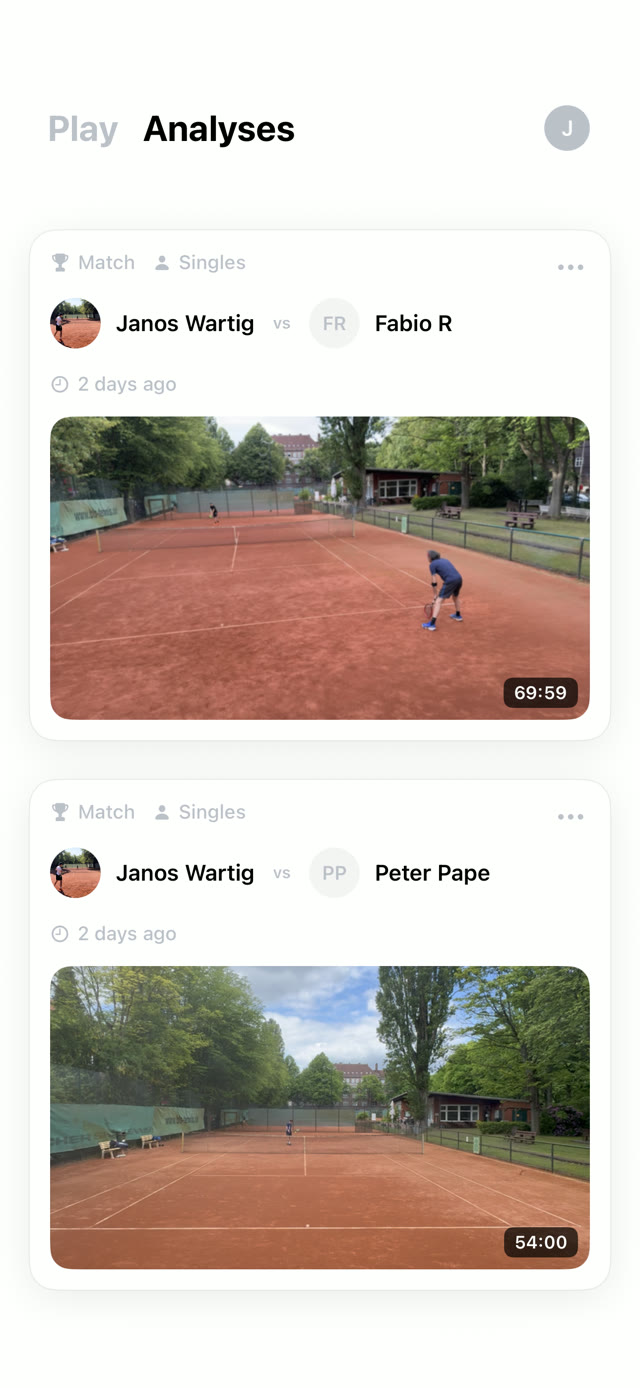
All your analyses land in your library, with date, point count and, if you like, the court you played on.
The analysis runs on your iPhone
The entire AI runs on your device and nothing is uploaded for the analysis. A video only reaches the cloud if you back it up yourself with Pro.
Analysis on your iPhone
No tracking, no adsServers in the EU
See your game like never before.
Start free and break down your next match point by point.
Questions & answers
Frequently asked questions
Everything about recording, analysis and accuracy.
Yes. The AI is trained specifically for tennis and reliably detects the points you play, even in changing light and from a normal court distance. If a cut isn't perfect, you can fix it by hand in seconds.
Every rally with its start and end, every shot with its speed and type, and every bounce on the court. That is what your match statistics are built from. On top of that come the ball trail, slow motion and the automatic highlight export in 16:9 and 9:16.
After every match the app puts both players’ numbers side by side: serves, the percentage of first serves in, double faults and the average speed of first and second serves. On top of that come the target zones of your serves, how your shot types break down with their speed, and the bounce marks on the court view. In practice sessions the app counts along the same way, just without the head to head.
With a good camera setup, bounce marks land within a few centimetres on the court view. That's enough to clearly spot patterns in your game, like shots falling short or the spread of your serve. Speed comes from the ball's flight in your video, so what you get is the real ball speed from your own recording. Worth knowing for comparison: radar guns on TV measure the ball right after contact, where it's fastest. Those numbers are therefore higher.
Yes. Clay, hard court, grass, carpet and indoor floors all work the same, because the surface makes no difference to the detection. The same goes for indoors and outdoors, in bright sun, under clouds and in the evening under floodlights. The courts next to you don't get in the way either, because the AI first finds your court and then only analyses what happens on it.
Just your iPhone and a steady angle. Set it up on a tripod or fence mount so the whole court is in frame. The built-in camera guide walks you step by step to the right position. That's all it takes, with no sensors, no smartwatch and nothing attached to your racket.
Recordings in HD or 4K at 60 FPS, either live in the app or imported from your library. The 60 FPS matter so the AI can split even fast rallies cleanly into individual points.
Neither. The entire analysis runs right on your iPhone and is ready by the time you leave the court. You don't need to upload anything or edit on a computer, and a club without Wi-Fi and with weak reception is fine. Your recordings stay on the iPhone throughout. A recording only leaves your device when you back it up or share it yourself.
Your next match deserves an analysis.
Download Raqet AI for free, film your game and then watch every point on its own, with shot speeds and bounce marks.